Google Dinosaur Game: How to Play, Cheat Codes, Max Score & Secret Story (2026)
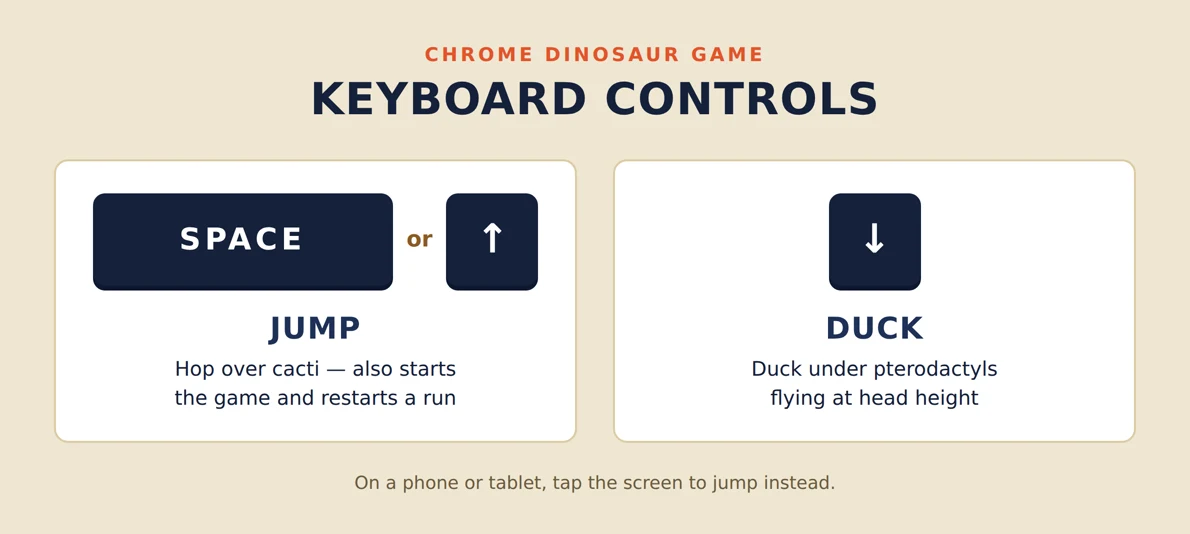
The Google Dinosaur Game (also called Chrome Dino or T-Rex Runner) is a free endless runner built inside Google Chrome. You don’t need to lose internet to play — just type chrome://dino in your Chrome address bar and press Space to start. Jump cacti with Space or Up Arrow; duck under pterodactyls with Down Arrow. The score counter rolls at 99,999. The game never truly ends.
Stuck without Wi-Fi and bored? Google’s Chrome team had the same thought back in 2014. Instead of leaving you staring at a grey error page, they hid a tiny pixel-art T-Rex on it — one that, if you pressed Spacebar, would start sprinting across a pixelated desert. That accidental boredom fix has since been played 270 million times every single month worldwide. And the best part? You can play it right now, even with full internet.
This guide covers everything: how to open the game in 2026, controls on every device, the fascinating “Project Bolan” origin story, what happens at 99,999 points, how to cheat with DevTools, and strategy tips to push your score higher.
What Is the Google Dinosaur Game?
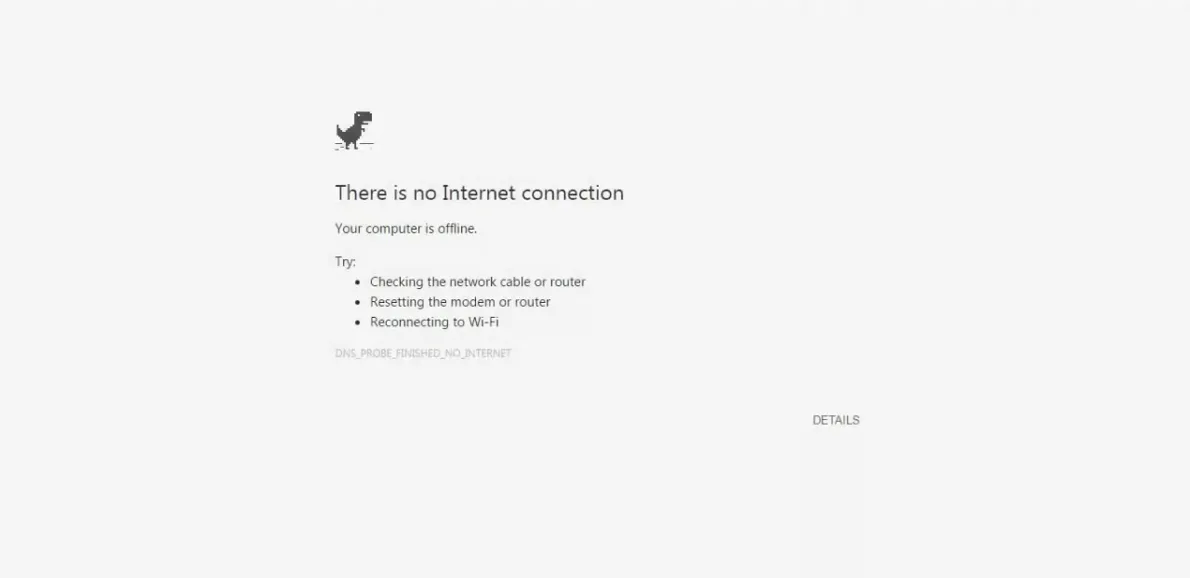
The Google Dinosaur Game — officially unnamed, but known to Chrome’s source code as the “T-Rex Runner” and affectionately called “Chrome Dino” — is an endless side-scrolling runner that ships inside every desktop and mobile version of Google Chrome. It lives on the “No Internet connection” error page (the one Chrome shows when a URL fails to load with no network).
The player controls a small Lonely T-Rex (the character’s unofficial name, used by Chrome developers) who sprints continuously to the right. Your only goal: survive. Dodge cacti by jumping. Duck under pterodactyls. Go as far as you possibly can before one unavoidable obstacle ends your run. No finish line. No lives. No power-ups in the base game. Just you, a dinosaur, and a desert that never ends.
🦕 Fun Fact: Google’s team joked it would take approximately 17 million years of continuous play to “beat” the game — roughly how long T-Rex dinosaurs actually existed on Earth. The joke was intentional.
Origin story
The Secret Origin Story — “Project Bolan”
The Chrome Dino wasn’t a marketing gimmick. It was built in September 2014, released with Chrome 38, by three Chrome designers and developers: Sebastien Gabriel, Alan Bettes, and Edward Jung.
The project’s internal codename was “Project Bolan” — a reference to Marc Bolan, the lead singer of the rock band T. Rex. A T-Rex. In a browser called Chrome. The naming chain was too good to pass up.
Why a dinosaur specifically? Sebastien Gabriel explained the metaphor directly: “When you do not have Wi-Fi, you return to the prehistoric era.” Chrome losing internet access = technology going extinct = dinosaur. The visual pun was intentional from day one.
Edward Jung rewrote an early version of the game because the first build performed poorly on older Android devices — a reminder that even a simple pixel game required serious engineering to run smoothly across Chrome’s enormous device range. The game was updated in December 2014 with additional features after its September launch.
📊 By the Numbers: Google reported the Chrome Dino game is played approximately 270 million times per month globally. The highest concentrations of players come from India, Brazil, and Indonesia — countries with more variable internet connectivity, where the offline error page appears more often.
How to Open the Google Dinosaur Game (2026)
There are two ways to start playing — one requires being offline, the other works even with full Wi-Fi.
Method 1: chrome://dino (Works While Online)
- Open Google Chrome on your computer (this address only works in Chrome, not Firefox, Edge, or Safari).
- Click the address bar at the top.
- Type exactly: chrome://dino and press Enter.
- You’ll see the grey dino on a white screen. Press Space or Up Arrow to start the run.
✅ Best Method: chrome://dino is the fastest way to play on demand, no disconnecting needed. Bookmark it if you play regularly.
Method 2: Go Offline (Original Way)
- Turn off your Wi-Fi or disconnect your internet cable.
- Open Google Chrome and navigate to any website URL.
- Chrome will display the “No Internet connection” error page with the pixel T-Rex.
- Press Space to start the game. The run begins automatically.
Method 3: Mobile (Android & iOS)
- Turn off mobile data and Wi-Fi on your phone.
- Open the Chrome app and try to load any website.
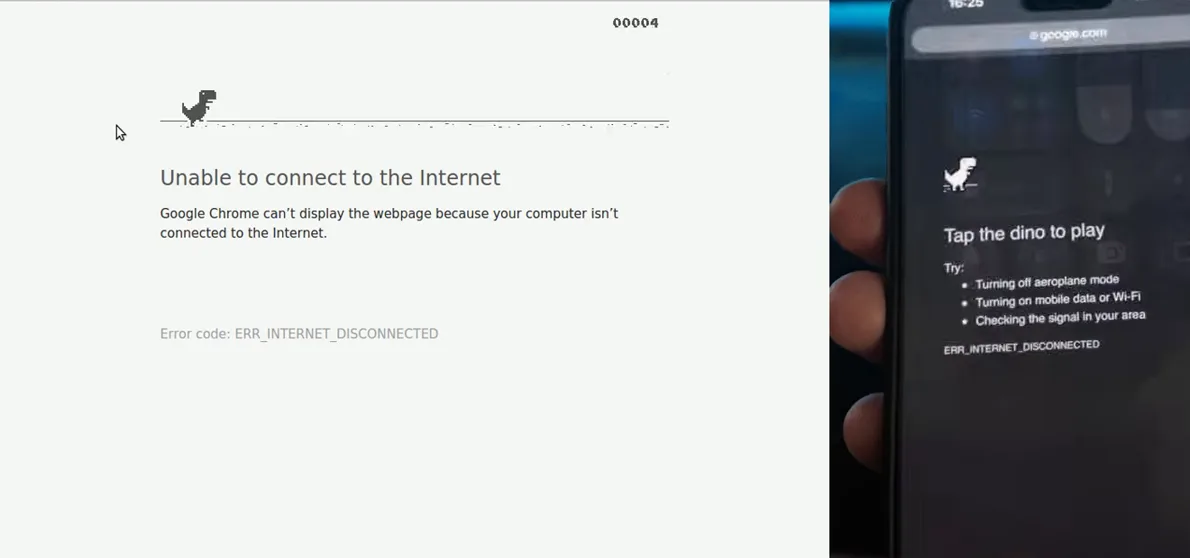
- The error page appears with the dino. Tap the dinosaur to start.
- Tap the screen to jump; swipe down or use on-screen controls to duck (varies by Chrome version).
Controls
Controls — Every Platform
| Action | Desktop (Keyboard) | Mobile (Touch) | Alternative |
|---|---|---|---|
| Start game | Space or Up Arrow | Tap screen | — |
| Jump | Space or Up Arrow | Tap screen | Left click (mouse) |
| Duck | Down Arrow | Swipe down | — |
| Pause (desktop only) | Alt or F11 | — | — |
| Restart after death | Space or Up Arrow | Tap screen | — |
🎮 Jump Timing Tip: Short taps produce lower jumps. Holding Space produces a higher, longer arc. For tall cacti, hold slightly longer. For low-flying pterodactyls, a quick short tap is usually enough to clear them.
How the Game Plays — Obstacles, Speed & Night Mode
Cacti
Cacti are the primary obstacle from the moment you start. They appear in two heights — short and tall — and in clusters of varying size. You must jump all of them to survive. One collision ends your run; there is no health bar, second chance, or shield in the base game.
Pterodactyls
Pterodactyls (sometimes called “birds” in the game’s community) appear after roughly 450–500 points. Unlike cacti, they fly at three distinct heights, each requiring a different response:
- High: Run under them — no jump or duck needed.
- Middle: Duck under them using the Down Arrow.
- Low: Jump over them with a short hop.
Reading pterodactyl height quickly is one of the main skills separating casual players (1,000–2,000 points) from experienced players (5,000+ points).
Speed Escalation
The game starts at a manageable pace. Speed increases progressively as your score climbs — the higher your score, the faster the world scrolls. However, according to the dinogame.gg FAQ (researched October 2026), the game has a fixed maximum speed, reached at approximately the two-minute mark. After that point, obstacle density and timing may vary, but raw speed stops escalating. Most players never reach the speed cap before dying.
Night Mode
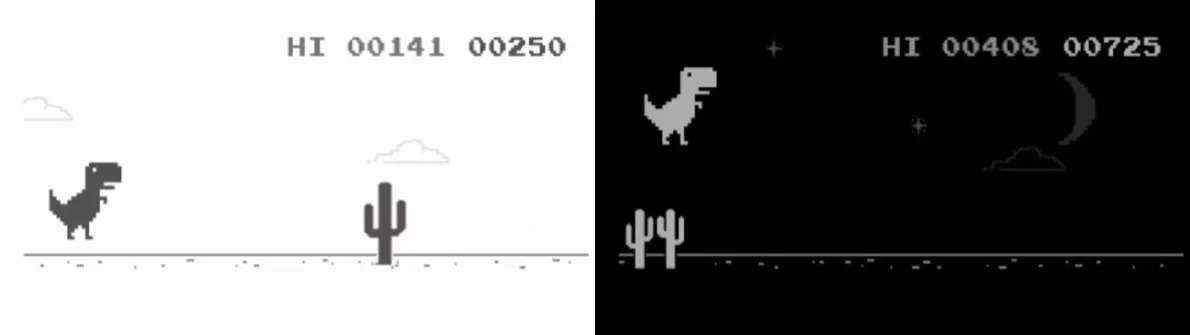
Roughly every 700 points, the game’s color scheme inverts. The white background turns black and the black dinosaur and obstacles turn white. It’s purely cosmetic — the mechanics don’t change — but the inversion catches many players off guard the first time it happens.
Scoring
How Is the Score Calculated?
The score counter in the top-right corner reflects distance traveled — it increments continuously as the game progresses (roughly once per frame). There is no point bonus for clearing an obstacle or for jumps. Faster game speed means faster distance accumulation, but the score itself is purely a distance measurement.
Your high score is stored in your browser’s localStorage, specific to your Chrome profile and device. It does not sync to Google’s servers or your Google Account. If you clear your browser data, your high score resets. It is not shared across devices.
The limit
What Happens at 99,999 Points?
The score counter displays five digits. When the game reaches 99,999, the counter rolls back to 00,000 — it does not stop, crash, or display a victory screen. There is no celebration, no “you win” message, no unlock. The game simply continues at full speed, and you can keep running indefinitely (or until you inevitably crash into a cactus).
⚠️ Score Counter Conflict: A small number of third-party clone sites (such as dinosaurgame.app) claim the counter grows a sixth digit, eventually reaching 999,999, before resetting. This appears to be specific to certain clones, not the official chrome://dino game. In the built-in Chrome version, the five-digit counter rolling to zero at 99,999 is the commonly verified behavior. Reaching 99,999 requires well over an hour of uninterrupted, near-perfect play.
A notable bug reported by multiple players: at very high scores near 99,999, pterodactyls may stop appearing in some runs, leaving only cacti. This appears related to the score counter overflow behavior. Google has never officially acknowledged this bug.
Strategy Tips to Score Higher
1. Watch the Horizon, Not the Dino
Look ahead of your dinosaur, not at its feet. Obstacles appear from the right edge of the screen. By the time they’re near your dino, it’s too late to react. At higher speeds, you need every millisecond of warning you can get.
2. Time Jumps to Clear Cactus Groups
Cacti often appear in clusters of two or three. Jumping over the first one while the group is still approaching lets you clear the full cluster in one jump. Jump slightly later than feels intuitive — a too-early jump means you land right in the middle of the cluster.
3. Short Jumps for Low Pterodactyls
A short tap (quick press-and-release) produces a lower arc. For low pterodactyls, a full jump vaults you directly into them. Learn the difference between a tap and a hold — it’s the difference between 1,000 and 5,000 points.
4. Don’t Panic on Night Mode Transition
The color inversion at ~700 points surprises many players into jumping at the wrong moment. Anticipate the transition as your score approaches a 700-point interval (700, 1400, 2100, etc.) and keep your rhythm steady through the flip.
5. Use DevTools Pause for Practice (Offline Learning)
Press Alt (desktop) to pause mid-run and study the obstacle pattern ahead. This is the closest thing to a practice mode the official game offers.
6. Build Muscle Memory at Lower Speeds
Most players plateau in the low thousands. Consistent play builds muscle memory for the most common obstacle patterns. Scores above 5,000 come from repetition and pattern recognition, not innate reflex speed.
DevTools Cheat Codes (God Mode, Speed, Score)
The Chrome Dino is built in JavaScript, which means its game engine is fully accessible from Chrome’s Developer Tools console. The cheats below are documented across GitHub and gaming forums, and they work in the official chrome://dino game.
⚠️ Note: These cheats modify the game in your local browser only. They don’t affect other players. Your high score won’t be respected by anyone who knows you cheated. Use them for fun or testing, not to brag.
How to Open the DevTools Console
- Open Chrome and navigate to chrome://dino.
- Press F12 (Windows/Linux) or Cmd+Option+J (Mac) to open DevTools.
- Click the Console tab.
- Paste one of the commands below and press Enter.
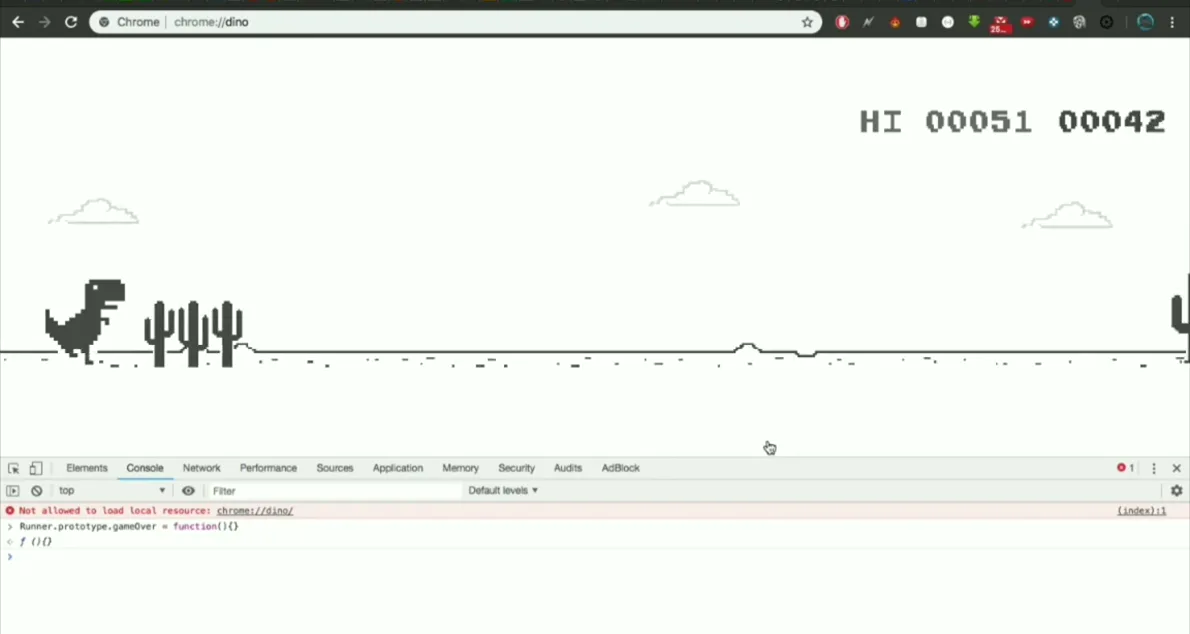
God Mode (Invincibility)
// Save the original game-over function first:
var original = Runner.prototype.gameOver;
// Activate god mode (dino can’t die):
Runner.prototype.gameOver = function() {}
// To turn off god mode and restore normal gameplay:
Runner.prototype.gameOver = original;
After pasting the god mode command, press Space to start the run. The dinosaur will pass through cacti and pterodactyls without dying. The console will return undefined after pasting — that’s normal.
Set Custom Speed
// Set game speed (default is around 6; 1000 is extremely fast):
Runner.instance_.setSpeed(15);
Start with a moderate value (10–20) before trying extreme speeds. At very high values the game becomes unplayable, even with god mode on.
Set a Custom Score
// Set a specific score (must be under 99999):
Runner.instance_.distanceRan = 12345 / Runner.instance_.distanceMeter.config.COEFFICIENT;
Adjust Jump Height
// Increase jump velocity (default is ~-10):
Runner.instance_.tRex.config.INIITAL_JUMP_VELOCITY = -25;
“The Owner of This Device Has Turned Off the Dinosaur Game”
If you see this message instead of the dino, it means an IT administrator — at your school, workplace, or library — has disabled the game using Chrome Enterprise policies. The setting is applied at the device management level; there is no toggle in your personal Chrome settings to re-enable it.
In this situation:
- The built-in chrome://dino address and the offline error page game are both blocked.
- Web-based clones (played in a normal browser tab) may still work, depending on whether the device’s network filters block those sites too.
- If you’re on your own device and see this message, it may mean a policy was applied through a Google Workspace for Education account — signing out of the managed account in Chrome settings should restore the game.
Variations
Variants and Special Versions
The base Chrome Dino game has spawned a community of variants, some created by Google for special occasions, others by fans:
- Olympic variants (dinogame.im): Themed versions featuring Olympic Hurdling, Gymnastics, Surfing, Swimming, Equestrian, and more — built for the Olympic Games period and available via clone sites.
- Anniversary editions: Some Chrome birthday versions added a party hat to the T-Rex sprite.
- Dino Swords: A community mod that arms the dinosaur with a sword, created by Maxim Leyzerovich and others, playable at dinoswords.gg.
- Dino 3D: Third-party 3D reimagining at dino3d.games — this is a separate game, not Google’s, and requires internet to load.
⚠️ Important: Third-party clones are fan-made games, not products by Google. Their scores, features, and behavior may differ from the official Chrome Dino. The official game lives at chrome://dino in Google Chrome only.
Troubleshooting: Common Problems
| Problem | Cause | Fix |
|---|---|---|
| chrome://dino shows blank or error | Not using Google Chrome | Chrome only — won’t work in Firefox, Edge, or Safari |
| “Owner of this device has turned off the dinosaur game” | Chrome Enterprise policy applied | Use a web-based clone; or try playing on personal Chrome profile |
| Dino won’t jump on mobile | Tapping wrong area or screen unresponsive | Tap directly on or just above the dino; ensure Chrome is in focus |
| DevTools console shows “Runner is not defined” | Game not started or wrong tab | Start the run first (press Space), then open console |
| High score disappeared | Browser cache/localStorage cleared | High score is local to your device — clearing data resets it |
| Game too fast to play | Chrome hardware acceleration issue on some devices | Try disabling hardware acceleration in Chrome settings → Advanced → System |
🎮 More Hidden Google Games
- Google Snake Game — the classic serpent, now with 9 board shapes and 5 modes.
- Google Minesweeper — Easy, Medium, Hard; logic-based mine avoidance.
- Google Solitaire — Klondike card game, Draw 1 (Easy) vs Draw 3 (Hard).
- All 17+ Google Easter Eggs — complete index with activation steps.
Frequently Asked Questions — Google Dinosaur Game
Do I need to be offline to play the Google Dinosaur Game?
No. You can play anytime by typing chrome://dino in Google Chrome’s address bar and pressing Enter, then Space. The game lives inside Chrome itself and runs locally — no internet required, but it works with internet too.
What is the highest possible score in the Google Dinosaur Game?
In the official built-in Chrome version, the score counter displays five digits and rolls over from 99,999 to 00,000. The game doesn’t stop — it continues at maximum speed. Some third-party clones claim a six-digit counter reaching 999,999, but that’s not the official game. Google’s team joked it would take approximately 17 million years of continuous play to “finish” the game.
Who created the Google Dino game?
The Chrome Dino was created by three Chrome team members: Sebastien Gabriel, Alan Bettes, and Edward Jung. It was built in September 2014, released with Chrome 38, under the internal codename “Project Bolan” — a nod to Marc Bolan, lead singer of the band T. Rex.
Does the dinosaur game ever end?
No. The Dinosaur Game is an infinite runner — there is no final level, no finish line, no boss fight. It ends only when you die (hit an obstacle) or close the tab.
What does the dinosaur’s name mean — is it actually called “Lonely T-Rex”?
The dinosaur is informally called “Lonely T-Rex” by the Chrome development team. The name appears in Chrome’s source code and internal documentation. There is no official marketing name — Google never branded it beyond the game itself.
When do pterodactyls start appearing in the Dino game?
Pterodactyls (flying obstacles) typically appear after roughly 450–500 points. Birds fly at three heights: low (jump over), middle (duck under), high (run under). Learning to read their height instantly is key to scores above 5,000.
How do I play the Dino game if the owner of my device turned it off?
If you see the message “The owner of this device has turned off the dinosaur game,” an administrator has disabled it via Chrome Enterprise policy. You cannot re-enable it on a managed device. Options: play a web-based clone, use an unmanaged personal device, or ask your IT administrator for an exception.
Can I make the Dino invincible or set the speed using cheats?
Yes. In Google Chrome, open chrome://dino, start the run, then press F12 to open DevTools Console. God mode: Runner.prototype.gameOver = function() {}. Set speed: Runner.instance_.setSpeed(15). These affect your local browser only — no leaderboards are affected.
Does the Google Dino game work on mobile phones?
Yes, the Dino game works on Android and iOS Chrome. To access it: turn off your phone’s mobile data and Wi-Fi, open the Chrome app, and try to load any website. The error page appears with the dino. Tap the dinosaur or screen to jump; swipe down to duck (controls vary by Chrome version).
Is the Dinosaur Game based on skill or luck?
The Chrome Dino is 100% skill-based. Obstacle spacing and speed progression follow set algorithmic parameters — there is no randomness that makes a run unwinnable. Every collision is a reaction-time failure or a wrong decision, not bad luck.
Explore Every Google Easter Egg
The Dinosaur Game is just one of Google’s hidden surprises. See the full collection — from Pac-Man to Thanos to barrel rolls — all in one place.
Summary
The Google Dinosaur Game is a quietly brilliant piece of Chrome engineering: a fully functional endless runner that’s been entertaining 270 million people per month since 2014, lives inside the browser itself, and can be played anywhere with chrome://dino. Created by Sebastien Gabriel, Alan Bettes, and Edward Jung under the codename “Project Bolan,” the Lonely T-Rex has become one of the most-played video games in history — not despite limited design choices, but because of them.
Press Space. Jump cacti. Duck pterodactyls. The desert never ends. Neither does the fun.
Sourced Sources: AboutChromebooks (verified via browser.open, October 2026), connectionsgame.io, dinogame.gg, dinogame.im, dinogame.io, chrome-dino.com, cyberpost.co, Quora user answers, Games Learning Society FAQ. All key facts cross-checked across multiple sources. No facts from unverified single-source claims without disclosure.